
SBL
Hands-off loudness and true-peak delivery, measured and proven.
Pick a delivery spec and SBL does the rest. It measures each file, sets its loudness, limits its true peak, then grades the result against the spec, with no knob-turning. Up to 12 limiters in series share the gain reduction, so no one stage has to do all the work. Fourteen delivery profiles cover airlines, streaming, broadcast, cinema, music, podcasts and immersive. Use it as a plugin, or let the batch app process whole folders.
THE FULL PRODUCT
The SBL Limiter app and the AAX, VST3 and AU plugins, with every profile, codec and batch feature.Nothing is held back.
FREE FOR 90 DAYS
Sign up, download the installer and start the trial with a free iLok account. We then add a 90-day beta license.
TELL US WHAT YOU HEAR
Beta testers shape the release. Send us your notes, your workflows and anything thatsurprised you.
Specifications
SBL, the Serial Batch Limiter, is a true-peak limiter with loudness compliance built in. Instead of one limiter doing all the work, 2 to 12 stages share the gain reduction (8 by default): a leveler, clean-up stages and an oversampled brickwall. Each stage makes a smaller change, which helps keep the mix intact and the pumping down. Loudness is measured to ITU-R BS.1770, with a dialogue level gated by speech detection. Oversampling runs from 1x to 32x. Available as an app and as AAX, VST3 and AU plugins for Apple silicon Macs. One license covers them all.
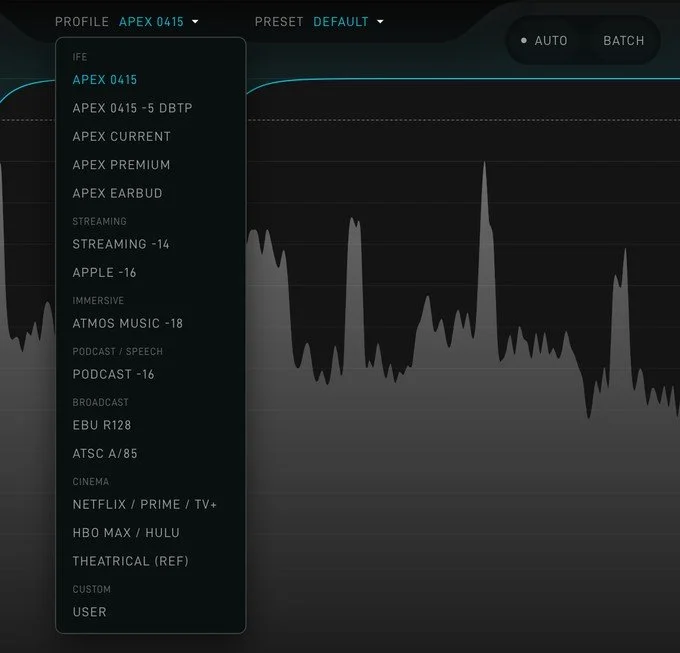
The PROFILE menu: every delivery profile, grouped by delivery.
Set the spec, not the knobs
Choose the delivery and SBL knows its targets. Fourteen profiles cover in-flight entertainment, streaming, immersive, podcast, broadcast and cinema, from APEX 0415 to EBU R128, ATSC A/85 and the film streaming services. One choice sets the ceiling, the level and every check. For a client's own spec, double-click any target and type a number. Save it to use again or to send to a colleague.

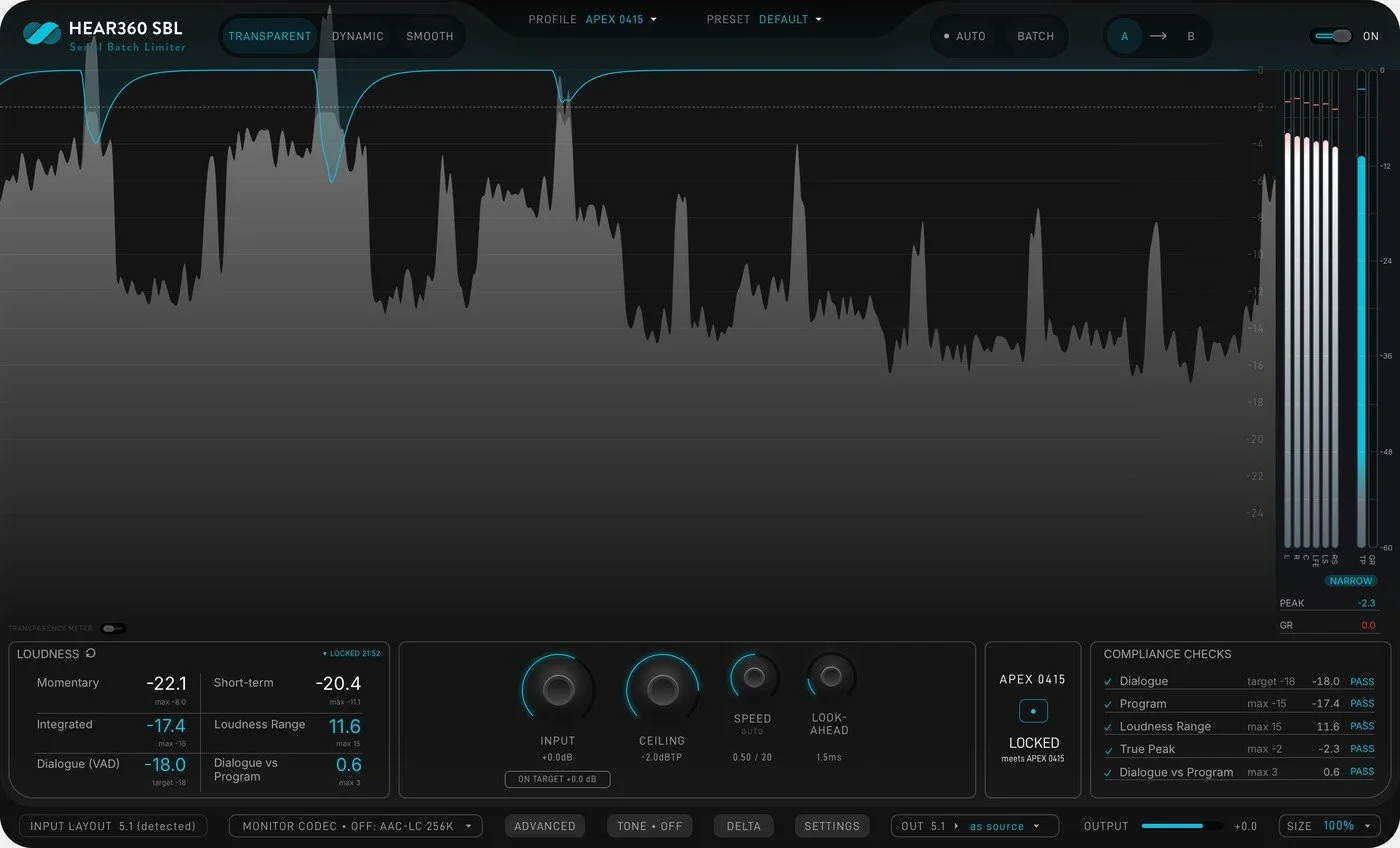
Playback stopped on an example program: the measurement is LOCKED and every APEX 0415 check passes.
Measured while you play, graded when you stop
SBL measures the program as it plays: momentary, short-term, integrated, loudness range, dialogue level and dialogue vs program. Stop playback and every target is graded PASS or FAIL, and SBL says what to change, for example "raise input 1.4 dB".
Whole folders, measured and proven
The SBL Limiter app processes whole folders with no DAW. Choose the folders, the profile and the delivery formats, and click PROCESS. Every file is measured, normalized, leveled if needed, limited, then measured again and graded, each with its own gain. Every run writes a CSV and JSON manifest to deliver with the audio.
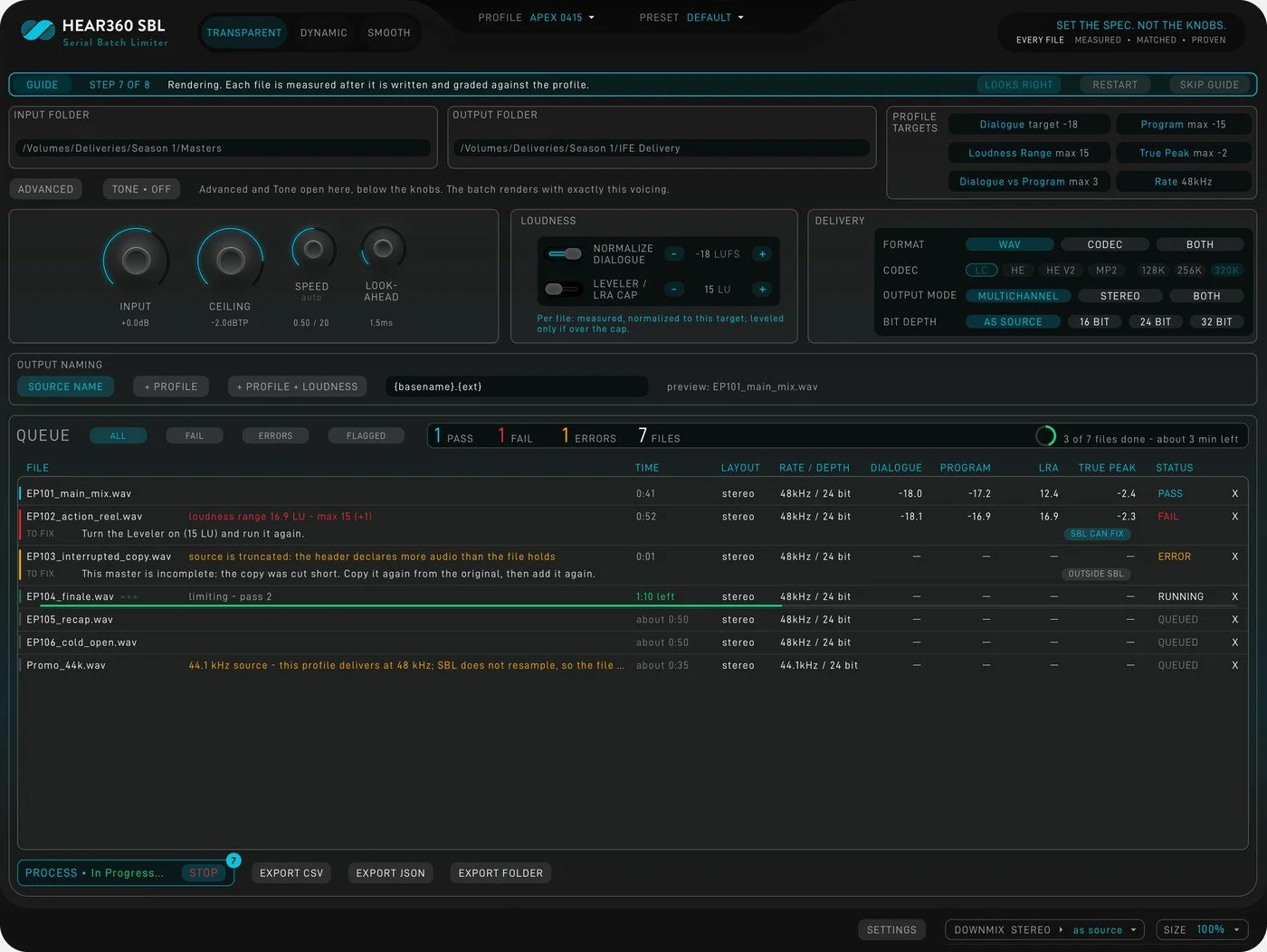
The app during an example run: one file passed, one failed, one had an error, one is running and three are queued.
Every codec, decoded and checked
A batch delivers AAC-LC, HE-AAC, HE-AAC v2 and MP2 beside the WAV. Each coded file is decoded, then measured and graded. Where encoding pushes a moment over the ceiling, SBL lowers the ceiling only there and encodes again, so the rest of the program keeps the sound of the WAV.
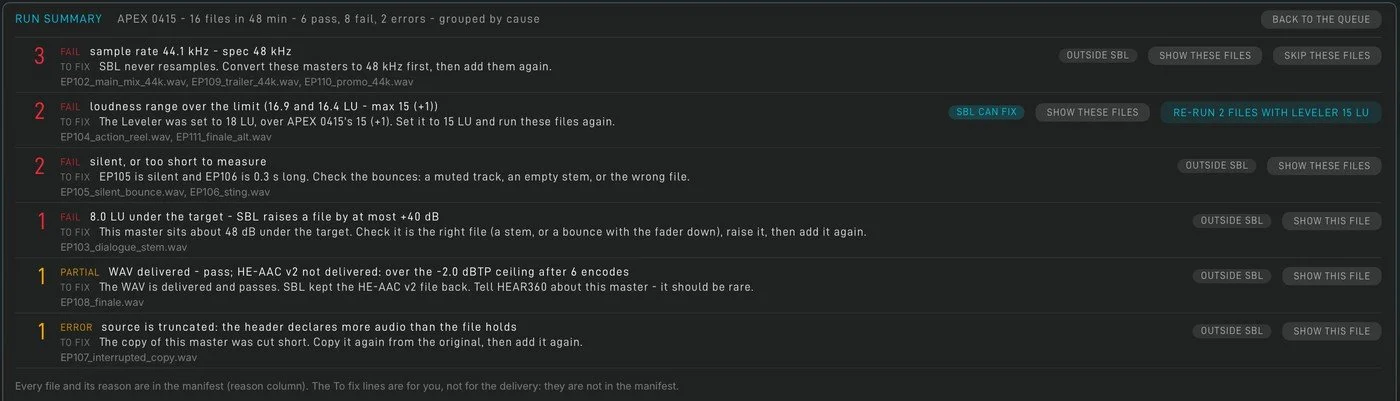
The Run summary after an example run of 16 files: 6 passed, 8 failed and 2 had errors, grouped by cause.
When a file fails, SBL says why
SBL lists every check a file failed, with the value and the limit, and a TO FIX line that says what to do. After the run, RUN SUMMARY groups those files by cause. Where SBL can fix a group, one button makes the change and runs only those files again.
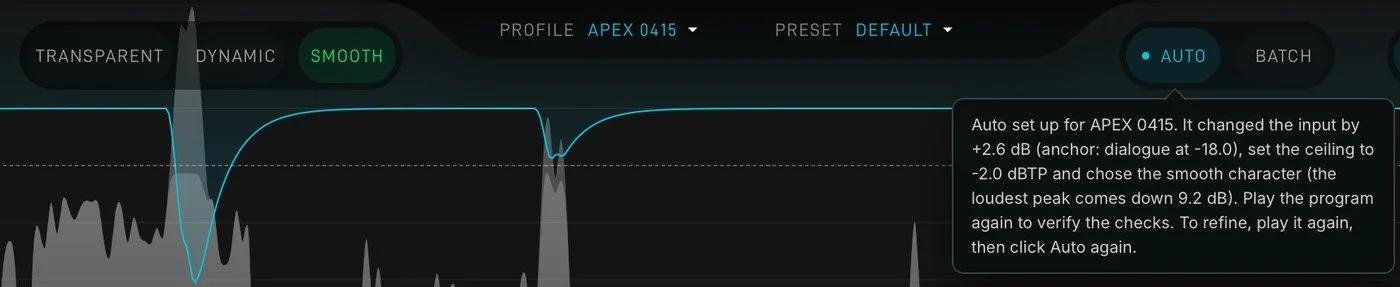
AUTO after an example program: it raised Input 2.6 dB, set the Ceiling to -2.0 dBTP and chose Smooth.
Three Characters, and AUTO
A Character sets how the limiter responds, in one click. Transparent, the default, gives the cleanest sound. Dynamic controls only the peaks, so loud scenes keep their full size. Smooth is for mixes that need more limiting, with minimal distortion and pumping. None adds saturation or clipping. AUTO does the setup for you. Click it, play the program once and stop: SBL sets the Input and the Ceiling for the profile and picks the Character.
See every stage
The Advanced page shows the gain reduction of each stage. Drag the Stage weights line to tilt the work toward the leveler or the brickwall.
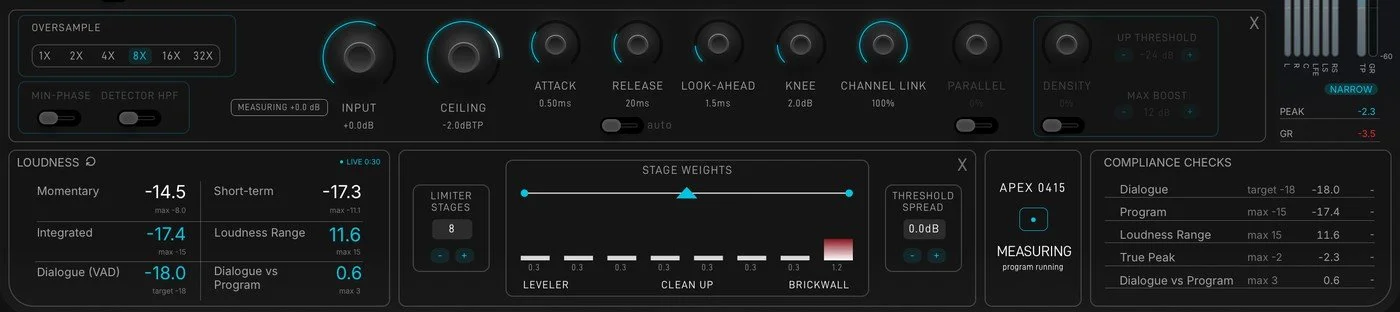
The Advanced page shows the gain reduction of each stage. Drag the Stage weights line to tilt the work toward the leveler or the brickwall.
Downmix to stereo
A Lo/Ro fold (ITU-R BS.775) of multichannel masters up to 9.1.6, with levels you set. A batch delivers the multichannel file, the stereo fold or both.
Delta and the transparency meter
Delta plays only what the limiter changes. The Transparency meter glows red where limiting may be changing the sound, not only the level.
Masters kept whole
SBL never resamples a WAV and never reorders channels. BWF metadata, start timecode and speaker labels carry through, and files over 4 GB are written as RF64.
Tone
A clean, minimum-phase tone shaper inside the chain: HPF, Bass, Tilt, Air and LPF. When Tone is off, it is a true bypass.
Presets and A/B
Two A/B slots in the plugin. Presets are shared by the app and every plugin format, so a preset saved in Pro Tools loads in the app.
Safe to run again
Run a folder again and SBL measures what it already made instead of making it again, unless the master, the profile or the settings changed. It never replaces a file it did not make.
In your session
The same engine and the same window in every format: AAX for Pro Tools, VST3 for Nuendo, Cubase, REAPER and other VST3 hosts, and AU for Logic Pro. Mono to 9.1.6, up to 16 channels, with latency reported to the host. Monitor codec lets you hear the AAC delivery while you set the limiter, and the Batch page processes a folder from inside your session.
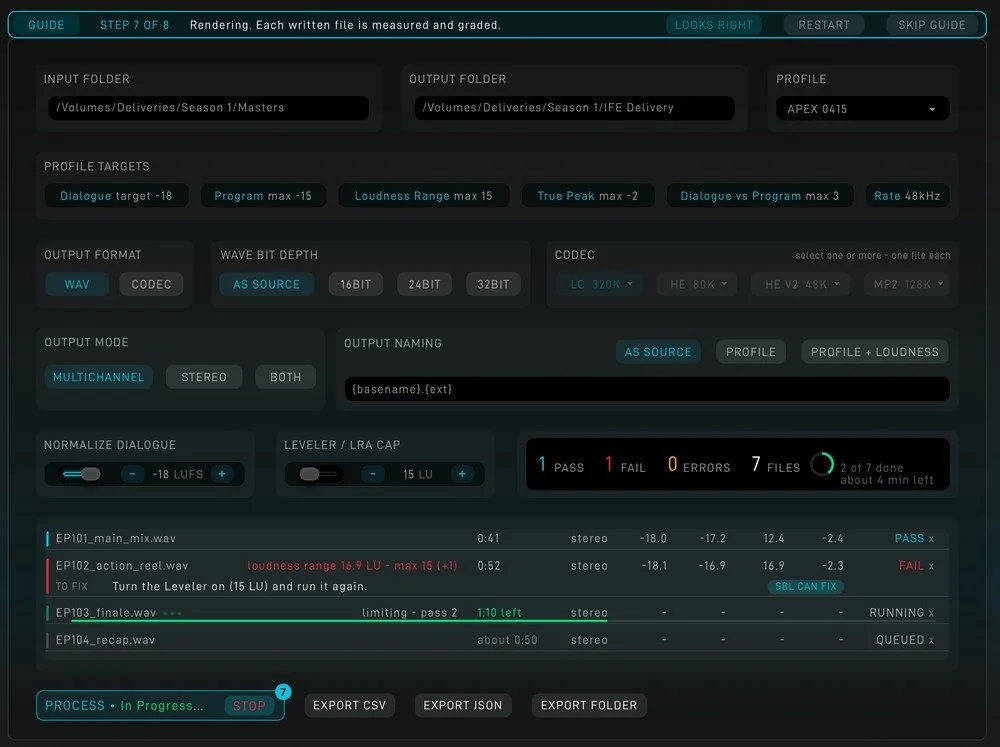
The plugin's Batch page during an example run.
SBL for Linux servers
For content service providers and transcode pipelines, SBL also runs on Linux servers. To ask about it, email accounts@hear360.io.
Private by design
SBL never uploads audio and sends no usage data. All processing runs on your Mac, and the only network contact is iLok license activation.
Requirements
Mac with Apple Silicon
macOS 12.3 Monterey or later
About 100 MB of disk space, plus room for the files you process
A free iLok account (your computer or an iLok USB
key, second generation or later)
FFmpeg, only for MP2 files
Formats and latency
App, AAX, VST3 and AU (64-bit, Apple silicon)
About 20 ms with Transparent or Smooth, 11 ms with
Dynamic, at 48 kHz, reported to the host
Mono to 9.1.6, up to 16 channels
Session rates from 44.1 to 192 kHz
Batch: 16-bit, 24-bit and 32-bit WAV in; WAV, AAC
and MP2 out
Beta FAQ
-
Yes. SBL starts with a 7-day trial, and we add a 90-day beta license to your iLok account. We do not ask for payment details.
-
The beta license expires after 90 days and we will offer a compelling discounted purchase price to the beta group as our appreciation for your participation.
-
Not yet. Clean Take requires a Mac with Apple silicon and macOS 12.3 or later.
-
Only to activate your iLok license. Processing happens entirely on your Mac.
-
Open the HEAR360 SBL folder in Applications and double-click Uninstall SBL. Your presets, specs and settings stay unless you choose to remove them, and your iLok licenses are not touched.

Set the spec. Not the knobs.
Every file measured, matched, proven.
Join the free 90-day Clean SBL beta. Sign up, and we'll take you straight to the download.